
MSG Viewer Pro6.0.0.326 - Download
You'll be able to download in few seconds.
Publisher Description
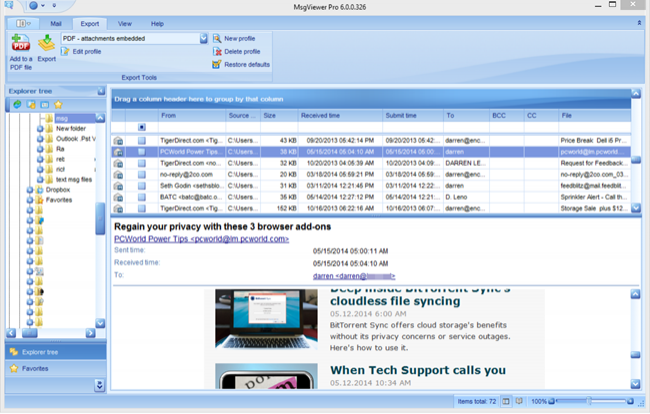
MSGViewer Pro is a powerful viewer and file manager for .msg and .eml email messages. View, search and print email messages without Outlook. Reply to .msg emails or forward using your default email client.
If you have tried other .msg viewers but haven't found one that really works, then MsgViewer Pro is for you. Rendering email messages is difficult because there are so many variations. Since 2006, MsgViewer Pro has set the standard for high quality email rendering.
MsgViewer Pro lets you extract file attachments from the .msg message file. Very simple to use. Can easily be set to be the default handler for .msg or .eml files.
Batch export messages to image formats including .pdf, .gif, tif, .jpg, pif, .bmp or .txt.
Batch rename emails with 'Bates Stamp' naming scheme. Export emails to .csv spreadsheet format.
MsgViewer Pro works well in a shared environment, such as TS or Citrix. Have multiple windows open simultaneously. Command line switches allow you to deactivate features that you do not want users to have access to.
Converting .msg or .eml emails to PDF is important to legal professionals. Use MsgViewer Pro to convert email to a single .pdf, or convert multiple .msg files to individual .pdf files. You can choose whether to convert email fille attachments to the .pdf image, or embed them as files.
Do you have msg or eml files sorted into directories? MsgViewer Pro will search for email files in recursive directories or your entire hard drive.
MsgViewer Pro is used by large corporations and governments, as well as small businesses and individuals.
MsgViewer Pro can also access Outlook .pst files if mapi is present on your computer. If you are moving from Outlook to another email client, MsgViewer Pro can help bridge the gap that your users may experience as they transition to the new client.
Download a trial today!
About MSG Viewer Pro
This Other Email Tools program is available in English, Arabic, Chinese, Danish, French, German, Hindi, Italian, Norwegian, Polish, Portuguese, Russian, Tagalog. It was last updated on 29 September, 2026. MSG Viewer Pro is compatible with the following operating systems: Windows.
The company that develops MSG Viewer Pro is Encryptomatic LLC. The latest version released by its developer is 6.0.0.326.
The download we have available for MSG Viewer Pro has a file size of 45.1 MB. Just click the green Download button above to start the downloading process. The program is listed on our website since 2014-10-28 and was downloaded 0 times. We have already checked if the download link is safe, however for your own protection we recommend that you scan the downloaded software with your antivirus. Your antivirus may detect the MSG Viewer Pro as malware if the download link is broken.
How to install MSG Viewer Pro on your Windows device:
- Click on the Download button on our website. This will start the download from the website of the developer.
- Once the MSG Viewer Pro is downloaded click on it to start the setup process (assuming you are on a desktop computer).
- When the installation is finished you should be able to see and run the program.
Program Details
General
System requirements
Download information
Pricing
Version History
version 6.0.0.326
posted on 2014-10-28
New user interface. Export from .msg to .pdf. Improved search. Auto updating.
Added additional languages. Various improvements, fixes and enhancements. For a full itemized list, visit www.encryptomatic.com/msgviewer/
Disclaimer
External Download
We do not host MSG Viewer Pro on our servers. We did not scan it for viruses, adware, spyware or other type of malware. This app is hosted by the software publisher and passed their terms and conditions to be listed there. We recommend caution when installing it.
The external download link for MSG Viewer Pro is provided to you by apps112.com without any warranties, representations or guarantees of any kind, so access it at your own risk.
If you have questions regarding this particular app contact the publisher directly. For questions about the functionalities of apps112.com contact us.
